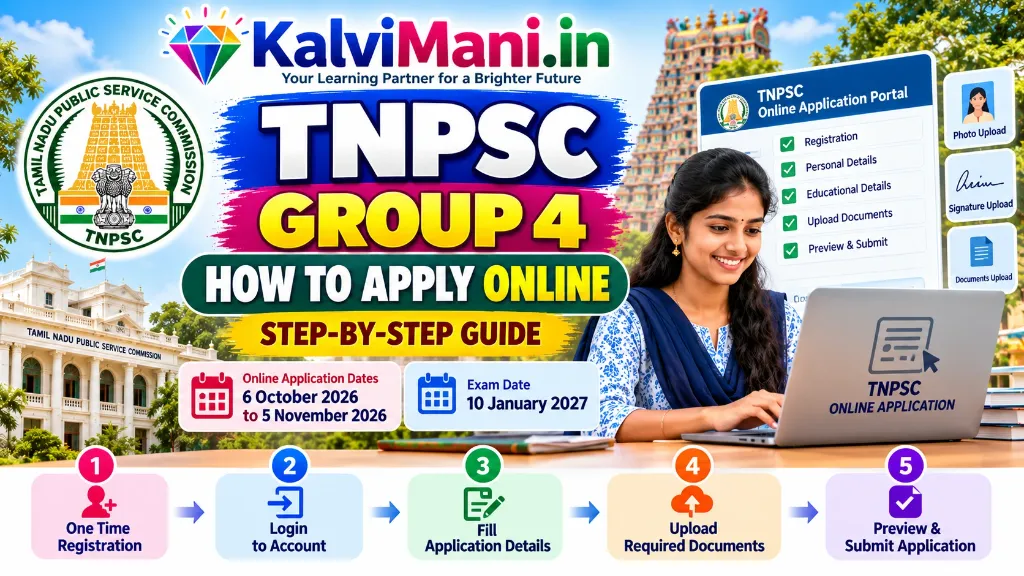
Applying for the Tamil Nadu Public Service Commission (TNPSC) Group 4 Examination 2026 requires following an exact, multi-stage online procedure through the official commission examination portal. With 6,574 tentative vacancies announced under Notification No. 11/2026 for posts including Village Administrative Officer (VAO), Junior Assistant, Typist, Steno-Typist, and Forest Watcher, candidates must complete their online submissions before the closing deadline of 5 November 2026 (11:59 PM). Before starting your registration, review our complete TNPSC Group 4 Notification 2026 Guide for full vacancy distribution and eligibility rules, align your study plan using the TNPSC Group 4 Syllabus & Exam Pattern Breakdown, prepare high-yield topics with free TNPSC Study Materials & Question Banks, and download foundational Samacheer Kalvi School Textbooks (Classes 6 to 10), 10th Standard Textbooks PDF, and 10th SSLC Study Materials for mastering the 100-mark mandatory Part A Tamil paper.
Because TNPSC enforces zero tolerance for mismatched personal details, incorrect Aadhaar linking, or flawed community/PSTM uploads, candidates cannot afford errors that risk application rejection or exam debarment. This comprehensive, step-by-step practical guide explains how to complete One Time Registration (OTR), fill the Group 4 application form, resize photographs and signatures to exact pixel specifications, claim the 20% PSTM (Persons Studied in Tamil Medium) quota, pay the examination fee, and utilize the application correction window.
டிஎன்பிஎஸ்சி குரூப் 4 (TNPSC Group 4) தேர்வு 2026-க்கு ஆன்லைனில் எவ்வாறு விண்ணப்பிப்பது? ஒருமுறை பதிவு (OTR), ஆதார் இணைப்பு, புகைப்படம் மற்றும் கையொப்ப அளவீடுகள், 20% தமிழ்வழி இடஒதுக்கீடு (PSTM) சான்றிதழ் சமர்ப்பித்தல் மற்றும் கட்டண சலுகைகள் குறித்த முழுமையான வழிகாட்டி கீழே கொடுக்கப்பட்டுள்ளது.
🚀 Direct Official Portals & Official Notification Links (அதிகாரப்பூர்வ இணைப்புகள்)
Click below to access the official TNPSC portals directly or read the authoritative notification PDF:
Online applications close strictly at 11:59 PM on 5 November 2026. Application correction window: 9 Nov 2026 to 11 Nov 2026.
Prerequisites & Documents Checklist (விண்ணப்பிக்க தேவையான ஆவணங்கள்)
Keep the following documents, credentials, and digital files ready before starting your session on tnpscexams.in to avoid session timeouts:
| Document / Requirement | Details Needed for Entry | Digital Upload Format |
|---|---|---|
| Aadhaar Card | 12-digit Aadhaar number with active mobile number linked for OTP validation | Aadhaar Authentication via OTR |
| SSLC / 10th Standard Mark Sheet | Registration Number, Certificate Number, Year & Month of Passing, Board of Examination | PDF (200 KB) if prompted during verification |
| HSC (+2) / Diploma Mark Sheet | Register Number, Month/Year, Board / DOTE details | For posts requiring higher qualifications |
| Degree Certificate | University, Degree Name, Month & Year of Passing (for Accounts/Officer posts) | Required for graduate post entries |
| Permanent Community Certificate | Certificate Number, Issuing Authority (Tahsildar/Dy. Tahsildar), District, Sub-caste | PDF format (200 KB) |
| PSTM Certificate (Annexure II) | Proof of continuous Tamil medium education from Class 1 to Class 10 (or prescribed level) | Mandatory for 20% PSTM quota claim |
| GTE Technical Certificates | Typewriting / Shorthand Senior/Junior Grade certificate numbers (for Typist/Steno posts) | Required for Typist and Steno-Typist |
| Recent Passport Size Photograph | Color photograph taken within last 3 months with Candidate Name and Date printed | JPG / JPEG (20 KB to 50 KB) |
| Signature of Candidate | Clear signature in blue or black ink on white paper | JPG / JPEG (10 KB to 20 KB) |
Photo & Signature Upload Specifications (புகைப்படம் & கையொப்பம் அளவீடுகள்)
TNPSC’s automated validation software automatically rejects images that do not conform to exact pixel and file size parameters. Use these exact specifications:
| Specification | Candidate Photograph (புகைப்படம்) | Candidate Signature (கையொப்பம்) |
|---|---|---|
| File Format | JPG / JPEG only | JPG / JPEG only |
| File Size Limits | 20 KB to 50 KB | 10 KB to 20 KB |
| Dimensions (Width × Height) | 3.5 cm × 4.5 cm (Approx. 200 × 230 Pixels) | 3.5 cm × 1.5 cm (Approx. 140 × 60 Pixels) |
| Resolution | 200 DPI recommended | 200 DPI recommended |
| Background & Quality | Clean white or off-white background with clear facial visibility | White paper background, blue/black ink |
| Special Mandate | Candidate Name and Date of Photograph MUST be printed at the bottom of the photo | Full running signature (do not sign in CAPITAL BLOCK letters) |
Phase 1: One Time Registration (ஒருமுறை பதிவு – OTR)
One Time Registration (OTR) is the mandatory master profile on the TNPSC examination portal. It holds your personal details, academic history, community status, and photo/signature for 5 years. An application for Group 4 cannot be submitted without an active OTR.
If You Are a NEW User:
- Go to www.tnpscexams.in and click on “One Time Registration / ஒருமுறை பதிவு”.
- Select “New User / புதிய பதிவு” and create a unique Login ID (minimum 6 to 12 alphanumeric characters) and a secure Password.
- Enter your SSLC details: 10th Registration Number, Board (State Board / Matric / CBSE), and Year of Passing. This locks your identity to your matriculation records.
- Enter your Personal Details: Name as per SSLC Mark Sheet, Date of Birth, Father’s Name, Mother’s Name, Gender, Religion, and Community.
- Link your Aadhaar Number: Enter your 12-digit Aadhaar number. An OTP will be dispatched to your Aadhaar-registered mobile number. Verify the OTP to establish electronic KYC.
- Upload your passport-size photo and signature conforming to the 20–50 KB and 10–20 KB limits.
- Pay the OTR Fee of Rs. 150 online using Net Banking, Debit Card, Credit Card, or UPI. Your OTR registration number will be generated immediately.
If You Are an EXISTING User:
Existing users who already created an OTR within the last 5 years do not need to pay the Rs. 150 OTR fee again. Simply log in with your Login ID and Password. If your Aadhaar linking is pending, authenticate your Aadhaar first to unlock your application dashboard.
Phase 2: Step-by-Step Group 4 Application Process
Once your OTR dashboard is active, submit your Group 4 application using these sequential steps:
- Step 1: Access Notification 11/2026: From your dashboard, click on “Apply / விண்ணப்பிக்க” and select Combined Civil Services Examination – IV (Group IV Services) — Notification No. 11/2026.
- Step 2: Choose Post Option:
• Option A (All Posts): Choose this if you want to be considered for all 46 post categories, including Forest Guard with Driving Licence and Forest Watcher (Subject to fulfilling height/chest and physical endurance requirements).
• Option B (Posts other than Forest Guard / Forest Watcher): Choose this if you prefer administrative and clerical posts only (Junior Assistant, Typist, VAO, Bill Collector, etc.). - Step 3: Verify Educational Qualifications: Confirm that your SSLC mark sheet details, certificate number, and board are accurate. For Typist / Steno-Typist, enter your Technical Typewriting (English & Tamil) grade details and Computer on Office Automation (COA) certificate data. For Junior Assistant (Accounts), enter your B.Com degree marks.
- Step 4: Claim 20% PSTM Quota: If you studied from Class 1st to Class 10th continuously in Tamil Medium in recognised schools in Tamil Nadu, select “YES” for PSTM. You must obtain the signed PSTM certificate from the Headmaster of each school you attended as per the official Annexure II format.
- Step 5: Select Examination Centres: Choose two distinct examination districts from the drop-down menu (e.g., Chennai and Tiruvallur, or Madurai and Dindigul). TNPSC assigns centres based on local capacity.
- Step 6: Confirm Declarations & Work Experience: For government servants or candidates employed in private institutions, fill in service details and indicate whether No Objection Certificate (NOC) has been applied for.
- Step 7: Application Preview & Verification: A complete preview of your multi-page application will be displayed. Verify every spelling of your name, parent names, date of birth, and community code. Tick each mandatory declaration checkbox.
Phase 3: Examination Fee Payment & Concessions (கட்டண விவரங்கள்)
The standard examination fee for TNPSC Group 4 is Rs. 100. Candidates eligible for statutory concessions must select their exemption carefully:
| Candidate Category | Exam Fee Payable | Concession Terms & Conditions |
|---|---|---|
| SC / SC (Arunthathiyar) / ST | Full Exemption (FREE) | Unlimited fee-free exam chances |
| Differently Abled Persons (PwBD) | Full Exemption (FREE) | Subject to benchmark disability (40% and above) |
| Destitute Widows (DW) | Full Exemption (FREE) | Must hold valid DW certificate issued by RDO / Sub-Collector |
| BC / BCM / MBC / DNC | Rs. 100 (or 3 Free Chances) | Eligible for three free chances in Commission examinations |
| Ex-Servicemen | Rs. 100 (or 2 Free Chances) | Eligible for two free chances in Commission examinations |
| General Category (Others / OC) | Rs. 100 | No fee concession; payable via Net Banking, Debit/Credit Card, UPI |
⚠️ Caution on Fee Concessions: Claiming an unentitled fee exemption by hiding previously availed free chances is treated by TNPSC as candidate suppression. If discovered during certificate verification, the candidate faces permanent disqualification and a 1-year debarment from all government exams.
Application Correction Window (விண்ணப்பத் திருத்தம் செய்யும் காலம்)
Recognising that candidates occasionally make unintentional typographical mistakes, TNPSC provides an official 3-day Application Correction Window:
- Correction Window Opens: 9 November 2026 (12:01 AM)
- Correction Window Closes: 11 November 2026 (11:59 PM)
During this window, candidates can log into their OTR and rectify data errors in qualification entries, community claims, uploaded photos, or selected exam centres. Once the clock strikes 11:59 PM on 11 November 2026, the database is permanently locked, and no further representations will be entertained under any circumstances.
Top 7 Critical Mistakes to Avoid (விண்ணப்பிக்கும் போது தவிர்க்க வேண்டிய தவறுகள்)
- Register Number vs Certificate Number Confusion: Many candidates mistakenly enter their certificate serial number instead of their SSLC Board Exam Roll / Registration number. Check your mark sheet carefully before typing.
- Mismatched Name with Aadhaar: The name on your application must match your SSLC certificate. If your Aadhaar card has initials expanded or misspelled, authenticate using the matching name protocol.
- Invalid PSTM Certificates: PSTM reservation applies only if your medium of instruction was Tamil from 1st standard to 10th standard without break. Studying 1st to 5th in English and 6th to 10th in Tamil disqualifies you from PSTM benefit.
- Old Photo Without Printed Name and Date: TNPSC guidelines mandate that the candidate’s name and photograph date (taken within 3 months) must be imprinted at the bottom of the photo. Standard selfies or passport photos without stamps are rejected.
- Inadvertently Deselecting Forest Posts: Selecting “Posts other than Forest Guard / Watcher” permanently excludes you from being considered for 41 forest service vacancies even if you score top marks.
- Signing in Block Capital Letters: Your signature must be in cursive, continuous handwriting. Block letter signatures are invalidated.
- Delaying Until 5 November 2026: Over 15 to 20 lakh aspirants apply for TNPSC Group 4. Servers face severe traffic slowdowns on the final 48 hours. Submit your application at least 5 days early.
TNPSC குரூப் 4 விண்ணப்பிப்பது எப்படி? – முக்கிய அம்சங்கள் (தமிழில்)
1. ஒருமுறை பதிவு (OTR): முதலில் www.tnpscexams.in தளத்தில் சென்று ஆதார் அட்டையுடன் இணைக்கப்பட்ட தொலைபேசி எண் மூலம் OTP சரிபார்த்து ஒருமுறை பதிவை (கட்டணம் ரூ. 150) முடிக்க வேண்டும். ஏற்கனவே OTR வைத்திருப்பவர்கள் மீண்டும் கட்டணம் செலுத்த தேவையில்லை.
2. விண்ணப்பப் படிவம்: OTR உள்நுழைவு (Login) செய்த பின், “விண்ணப்பிக்க (Apply)” என்பதைத் தேர்வு செய்து அறிவிக்கை எண் 11/2026-ஐ தேர்வு செய்ய வேண்டும்.
3. தகுதிகள் & PSTM சான்றிதழ்: 10-ஆம் வகுப்பு மதிப்பெண் சான்றிதழ் விவரங்கள், சாதிச் சான்றிதழ் விவரங்களை உள்ளிடவும். 1 முதல் 10-ஆம் வகுப்பு வரை தமிழில் படித்தவர்கள் 20% முன்னுரிமை பெற தலைமை ஆசிரியரிடம் உரிய படிவத்தில் (Annexure II) PSTM சான்றிதழ் பெற்று பதிவேற்ற வேண்டும்.
4. தேர்வுக் கட்டணம்: பொதுப்பிரிவு மற்றும் ஓபிசி விண்ணப்பதாரர்கள் தேர்வுக் கட்டணம் ரூ. 100 செலுத்த வேண்டும் (SC/ST/மாற்றுத்திறனாளிகள்/ஆதரவற்ற விதவைகளுக்கு முழு விலக்கு).
5. கடைசி நாள்: ஆன்லைனில் விண்ணப்பிக்க கடைசி நாள் 05 நவம்பர் 2026. விண்ணப்பத்தில் திருத்தம் செய்ய 09.11.2026 முதல் 11.11.2026 வரை அவகாசம் வழங்கப்படும்.
Frequently Asked Questions (FAQ)
Q: What is the last date to apply online for TNPSC Group 4 2026?
The last date to submit online applications for TNPSC Group 4 (Notification No. 11/2026) is 5 November 2026 up to 11:59 PM on tnpscexams.in.
Q: Is Aadhaar linking mandatory for TNPSC Group 4 application?
Yes, linking your 12-digit Aadhaar number with your One Time Registration (OTR) profile via OTP authentication is mandatory before applying.
Q: Can I edit my TNPSC Group 4 application after submission?
Yes. TNPSC provides an official Application Correction Window from 9 November 2026 (12:01 AM) to 11 November 2026 (11:59 PM) where submitted details can be edited.
Q: What is the application fee for TNPSC Group 4?
The examination fee is Rs. 100. New candidates also pay Rs. 150 for One Time Registration (valid 5 years). SC, ST, PwBD, and Destitute Widows receive full fee exemptions.
Q: What are the specifications for the photograph in TNPSC application?
The photograph must be in JPG/JPEG format between 20 KB and 50 KB (3.5 cm × 4.5 cm), taken within the last 3 months, with candidate name and date of photo printed at the bottom.
Q: Who is eligible for the 20% PSTM reservation quota in Group 4?
Candidates who studied from Class 1 to Class 10th (or up to the prescribed educational qualification) continuously through Tamil medium in recognised schools are eligible.
Q: Where can I download the official TNPSC Group 4 Notification PDF?
You can download the official notification PDF directly in Tamil (Download Tamil PDF) or English (Download English PDF).
Pingback: TNUSRB Police Constable & Sub-Inspector Recruitment 2026: Physical Eligibility, PMT/PET & Exam Guide